

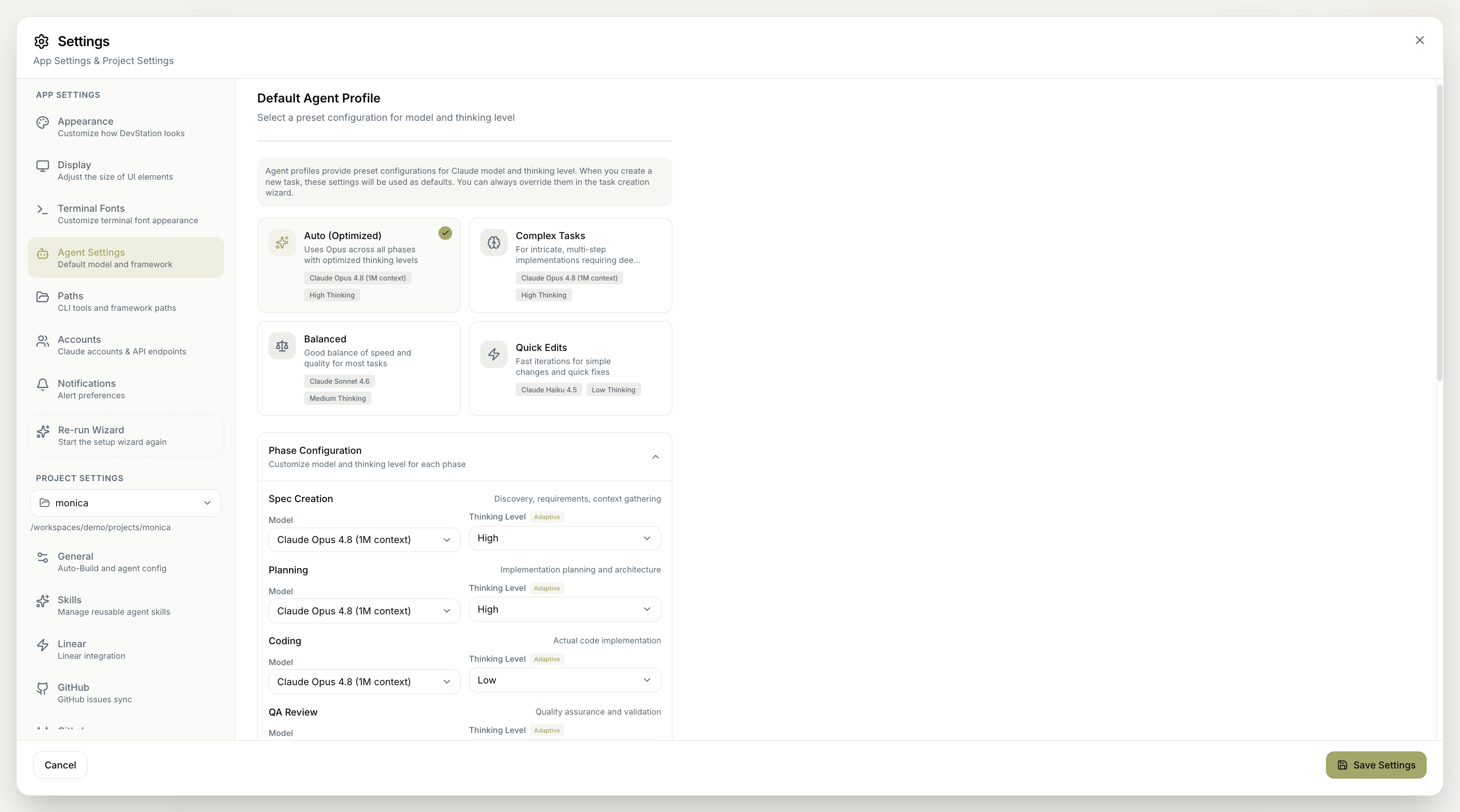
The Agent Settings control which Claude model and thinking level agents use, and how they behave on autonomous tasks. You choose a default agent profile that presets these for every new task, can fine-tune the model per phase, and can set the models used by individual features. These are defaults — you can always override them in the task creation wizard. Screenshot 2026 06 23 At 1 21 30 PM

On this page

Default agent profile

An agent profile is a preset configuration of model and thinking level. When you create a new task, the selected profile’s settings are used as the defaults. Choose from:
ProfileBest forConfiguration
Auto (Optimized)A sensible default — uses Opus across all phases with optimized thinking levels.Claude Opus 4.8 (1M context), High Thinking
Complex TasksIntricate, multi-step implementations needing deep analysis.Claude Opus 4.8 (1M context), High Thinking
BalancedA good balance of speed and quality for most tasks.Claude Sonnet 4.6, Medium Thinking
Quick EditsFast iterations for simple changes and quick fixes.Claude Haiku 4.5, Low Thinking
Whatever profile you choose only sets the defaults for new tasks. You can override the model and thinking level for any individual task in the task creation wizard.

Phase configuration

Beyond the profile, you can customize the model and thinking level for each phase of a task independently:
  • Spec Creation — discovery, requirements, and context gathering.
  • Planning — implementation planning and architecture.
  • Coding — the actual code implementation.
  • QA Review — quality assurance and validation.
For each phase you set a Model and a Thinking Level (which can be Adaptive, or a fixed level such as High or Low). This lets you spend more reasoning where it matters — for example, heavier thinking during Spec Creation and Planning, lighter during Coding and QA.

Other agent settings

Additional configuration for how agents work:
  • Agent Framework — the coding framework used for autonomous tasks.
  • AI Terminal Naming — automatically names terminals based on the commands run (uses Haiku).

Feature model settings

Several features run their own AI, and you can set the model and thinking level for each one separately:
FeatureWhat it doesModel / Thinking
Insights ChatAsk questions about your codebase.Claude Sonnet 4.6 / Medium
IdeationGenerate feature ideas and improvements.Claude Opus 4.8 (1M context) / High
RoadmapCreate strategic feature roadmaps.Claude Opus 4.8 (1M context) / High
GitHub IssuesAutomated issue triage and labeling.Claude Opus 4.8 (1M context) / Medium
GitHub PR ReviewAI-powered pull request reviews.Claude Opus 4.8 (1M context) / Medium
UtilityCommit messages and merge-conflict resolution.Claude Haiku 4.5 / Low
Match the model to the job: reserve Opus with high thinking for complex reasoning (planning, ideation, roadmaps), use Sonnet for balanced everyday work, and let Haiku handle fast, mechanical tasks like commit messages and terminal naming.
Remember to click Save Settings to apply your changes. Cancel discards them.