> ## Documentation Index
> Fetch the complete documentation index at: https://docs.myaione.com/llms.txt
> Use this file to discover all available pages before exploring further.
# Worktrees
> Manage the isolated workspaces behind your tasks. Every task runs in its own git worktree — a dedicated branch and working directory — so parallel work never collides. Review each one's changes and merge, copy, or remove it.
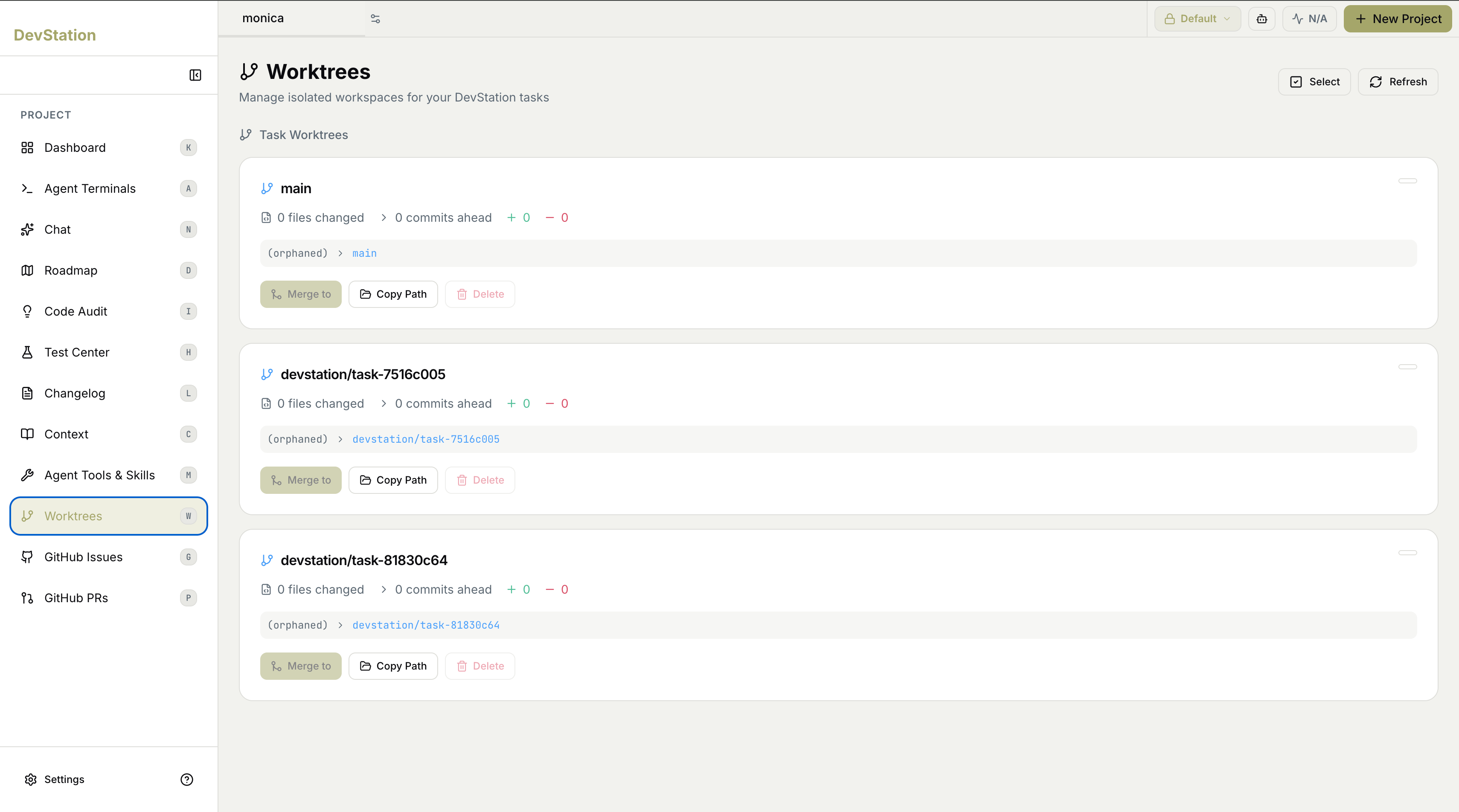
**Worktrees** is where you manage the isolated workspaces that back your tasks. Every task MyaiOne for Development runs gets its own **worktree** — a dedicated git branch and working directory, separate from main and from every other task. That isolation is what makes parallel work safe: two agents can edit the same project at once without ever sharing files or stepping on each other's changes. This page lets you see each worktree's state and act on it. Use **Refresh** to update the list and **Select** to act on worktrees in bulk.
 ## Task worktrees
Under **Task Worktrees**, each active worktree appears as a card — one for your main workspace and one for each task currently isolated in its own branch. Together they give you a complete picture of what's in flight and how far each piece of work has diverged from main.
## What each card shows
Every worktree card summarizes the state of that workspace:
* **Branch** — the git branch the worktree is working on.
* **Files changed** — how many files differ from the base.
* **Commits ahead** — how many commits this branch is ahead of main.
* **Additions and deletions** — the lines added (+) and removed (−) in this worktree.
* **Status** — the worktree's current state and which branch it maps to.
Because each task lives in its own worktree, the changes shown on a card are scoped to that task alone. Nothing here affects main — or any other task — until you explicitly merge it.
## Worktree actions
Each card offers actions to manage that workspace:
* **Merge to** — merge this worktree's changes into another branch when the work is ready.
* **Copy Path** — copy the worktree's filesystem path, handy for opening it in a terminal or editor.
* **Delete** — remove the worktree once you're done with it.
Worktrees are created and used automatically as tasks run — you'll mostly visit this page to merge finished work or to clean up worktrees from tasks that are complete. For the full parallel-work walkthrough, see [Run parallel agents without collisions](/run-parallel-agents-without-collisions).
## Task worktrees
Under **Task Worktrees**, each active worktree appears as a card — one for your main workspace and one for each task currently isolated in its own branch. Together they give you a complete picture of what's in flight and how far each piece of work has diverged from main.
## What each card shows
Every worktree card summarizes the state of that workspace:
* **Branch** — the git branch the worktree is working on.
* **Files changed** — how many files differ from the base.
* **Commits ahead** — how many commits this branch is ahead of main.
* **Additions and deletions** — the lines added (+) and removed (−) in this worktree.
* **Status** — the worktree's current state and which branch it maps to.
Because each task lives in its own worktree, the changes shown on a card are scoped to that task alone. Nothing here affects main — or any other task — until you explicitly merge it.
## Worktree actions
Each card offers actions to manage that workspace:
* **Merge to** — merge this worktree's changes into another branch when the work is ready.
* **Copy Path** — copy the worktree's filesystem path, handy for opening it in a terminal or editor.
* **Delete** — remove the worktree once you're done with it.
Worktrees are created and used automatically as tasks run — you'll mostly visit this page to merge finished work or to clean up worktrees from tasks that are complete. For the full parallel-work walkthrough, see [Run parallel agents without collisions](/run-parallel-agents-without-collisions).