> ## Documentation Index
> Fetch the complete documentation index at: https://docs.myaione.com/llms.txt
> Use this file to discover all available pages before exploring further.
# Code Audit
> A consolidated audit of your project. Code Audit runs multiple open-source scanners and surfaces AI-generated improvement ideas across security, code, UI/UX, docs, and performance — each one convertible into a tracked task.
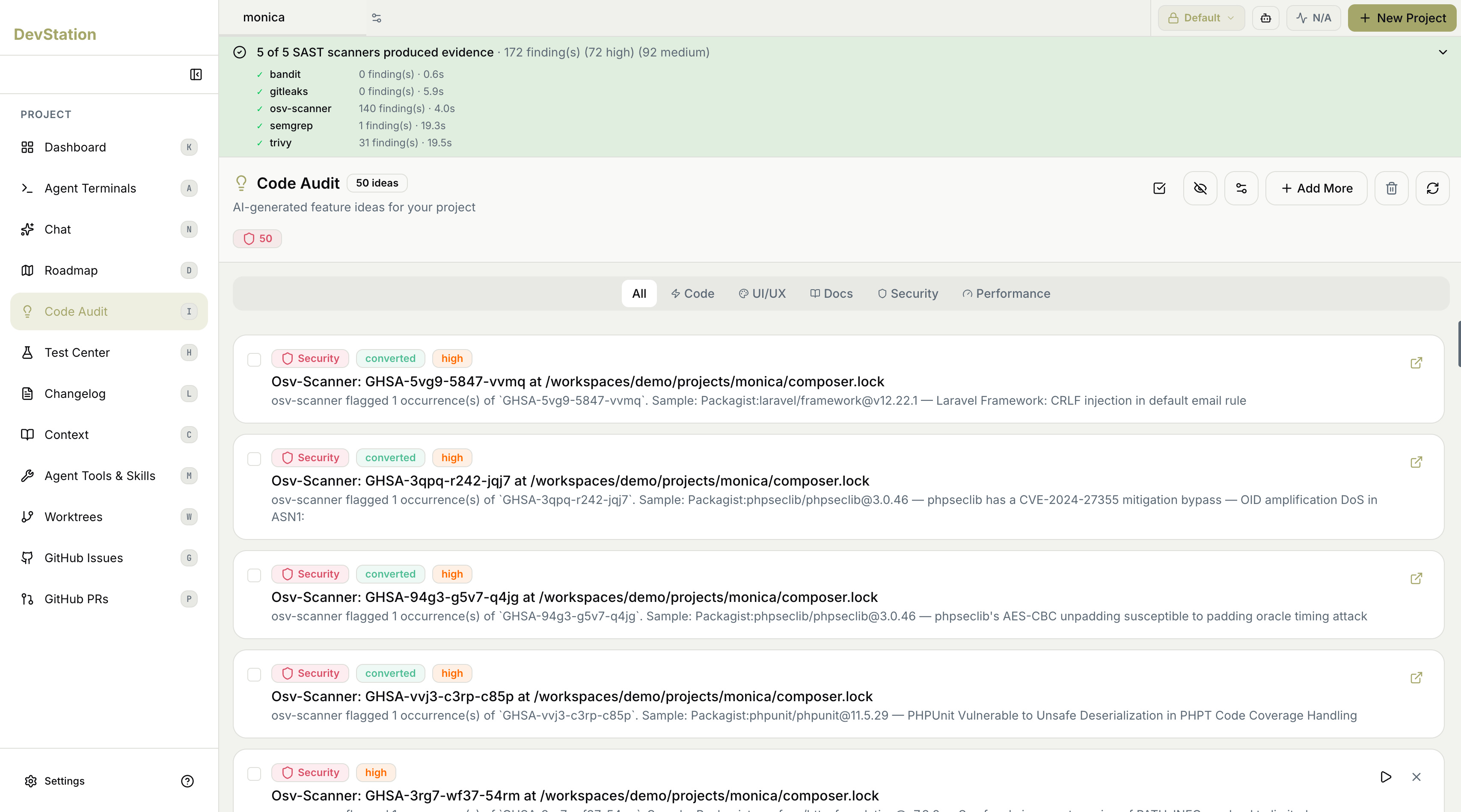
**Code Audit** gives you a single, ranked view of everything worth improving in your project. It runs a suite of open-source scanners against your repository and combines their results with AI-generated improvement ideas, organized by category. From here you can review each item and convert it straight into a task on your board.
 ## Scanner coverage
A banner at the top summarizes the security scan: how many scanners produced evidence, and the total number of findings broken down by severity (such as high and medium). Expand it to see each scanner individually — with its name, how many findings it produced, and how long it took to run.
The scanners are established open-source tools, each strong at a different kind of check:
| Scanner | What it's best at |
| --------------- | ----------------------------------------------------------------------------- |
| **bandit** | Security issues in Python source code. |
| **gitleaks** | Secrets and credentials accidentally committed to the repo. |
| **osv-scanner** | Known vulnerabilities in your dependencies, matched against the OSV database. |
| **semgrep** | Pattern-based static analysis across many languages. |
| **trivy** | Vulnerabilities across dependencies, containers, and the filesystem. |
Running several scanners and consolidating their output means a single problem reported by more than one tool is grouped together — you act on it once instead of chasing duplicate alerts.
## Ideas and findings
Beyond raw scanner output, Code Audit presents **AI-generated improvement ideas for your project**, shown as a ranked list with a count of how many ideas exist. Each item is a card showing:
* **Category** — what kind of improvement it is (for example, Security).
* **Severity** — the priority of the item (for example, high).
* **Status** — whether you've already acted on it; an item turned into a task is marked **converted**.
* **Title and description** — what was found and where, with a short explanation. Use the open-external icon on a card to view the underlying detail.
## Filtering by category
Code Audit covers more than security. Use the category tabs to focus the list:
* **All** — everything in one list.
* **Code** — code-quality and implementation improvements.
* **UI/UX** — user interface and experience suggestions.
* **Docs** — documentation gaps.
* **Security** — vulnerabilities and hardening, backed by the scanners above.
* **Performance** — efficiency and speed improvements.
## Working with findings
The toolbar and per-card controls let you manage the list:
* **Add More** — generate additional ideas for the project.
* **Select** — use the checkboxes to act on items in bulk.
* **Hide** — dismiss items you don't want to see.
* **Filter and sort** — reorder or narrow the list.
* **Refresh** — re-run to pick up the latest state.
* **Delete** — remove items from the list.
To act on an item, convert it into a tracked task — it moves onto your kanban board and is picked up by the build pipeline. The full flow from a finding to a reviewed pull request is covered in [Patch a security vulnerability end-to-end](/patch-a-security-vulnerability-end-to-end).
## Scanner coverage
A banner at the top summarizes the security scan: how many scanners produced evidence, and the total number of findings broken down by severity (such as high and medium). Expand it to see each scanner individually — with its name, how many findings it produced, and how long it took to run.
The scanners are established open-source tools, each strong at a different kind of check:
| Scanner | What it's best at |
| --------------- | ----------------------------------------------------------------------------- |
| **bandit** | Security issues in Python source code. |
| **gitleaks** | Secrets and credentials accidentally committed to the repo. |
| **osv-scanner** | Known vulnerabilities in your dependencies, matched against the OSV database. |
| **semgrep** | Pattern-based static analysis across many languages. |
| **trivy** | Vulnerabilities across dependencies, containers, and the filesystem. |
Running several scanners and consolidating their output means a single problem reported by more than one tool is grouped together — you act on it once instead of chasing duplicate alerts.
## Ideas and findings
Beyond raw scanner output, Code Audit presents **AI-generated improvement ideas for your project**, shown as a ranked list with a count of how many ideas exist. Each item is a card showing:
* **Category** — what kind of improvement it is (for example, Security).
* **Severity** — the priority of the item (for example, high).
* **Status** — whether you've already acted on it; an item turned into a task is marked **converted**.
* **Title and description** — what was found and where, with a short explanation. Use the open-external icon on a card to view the underlying detail.
## Filtering by category
Code Audit covers more than security. Use the category tabs to focus the list:
* **All** — everything in one list.
* **Code** — code-quality and implementation improvements.
* **UI/UX** — user interface and experience suggestions.
* **Docs** — documentation gaps.
* **Security** — vulnerabilities and hardening, backed by the scanners above.
* **Performance** — efficiency and speed improvements.
## Working with findings
The toolbar and per-card controls let you manage the list:
* **Add More** — generate additional ideas for the project.
* **Select** — use the checkboxes to act on items in bulk.
* **Hide** — dismiss items you don't want to see.
* **Filter and sort** — reorder or narrow the list.
* **Refresh** — re-run to pick up the latest state.
* **Delete** — remove items from the list.
To act on an item, convert it into a tracked task — it moves onto your kanban board and is picked up by the build pipeline. The full flow from a finding to a reviewed pull request is covered in [Patch a security vulnerability end-to-end](/patch-a-security-vulnerability-end-to-end).