> ## Documentation Index
> Fetch the complete documentation index at: https://docs.myaione.com/llms.txt
> Use this file to discover all available pages before exploring further.
# Changelog
> Generate a changelog for your project from completed tasks, git history, or a comparison between two branches — then review and release it through a guided three-step flow.
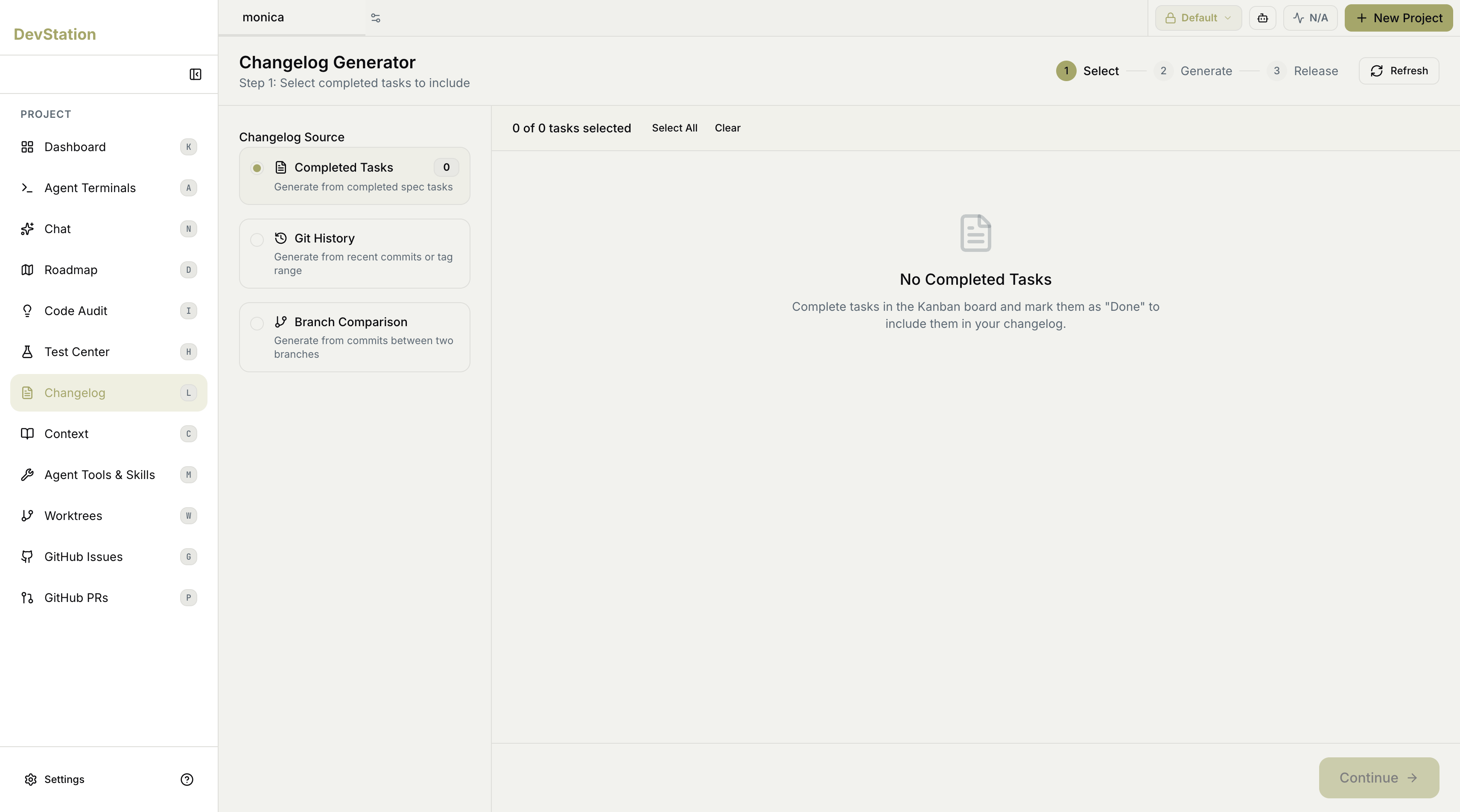
**Changelog** turns the work you've shipped into a written changelog. The **Changelog Generator** walks you through three steps — **Select**, **Generate**, and **Release** — starting with where the changelog should be built from. You can draw on completed tasks, raw git history, or the difference between two branches.
 ## The three steps
A progress indicator at the top tracks where you are:
1. **Select** — choose the source and the specific items to include.
2. **Generate** — produce the changelog from your selection.
3. **Release** — finalize and publish it.
**Continue** moves you forward through the steps, and **Refresh** reloads the current data.
## Choosing a source
Step 1 asks for a **Changelog Source**. Pick one of three:
* **Completed Tasks** — generate from completed spec tasks.
* **Git History** — generate from recent commits or a tag range.
* **Branch Comparison** — generate from the commits between two branches.
Your choice changes what appears on the right, where you refine exactly what gets included.
## Completed Tasks
This source builds the changelog from tasks you've finished. It shows how many completed tasks are available and lets you choose which to include — **Select All** or **Clear** to manage the selection in bulk, with a running count of how many are selected.
Only tasks marked **Done** on the kanban board count here. If nothing appears, complete tasks and move them to **Done** to make them available to the changelog.
## Git History
This source builds from your commit history. A **Git History Options** panel lets you tune what's pulled in:
* **History Type** — for example, recent commits.
* **Number of Commits** — how many commits back to include.
* **Include merge commits** — whether merge commits are counted.
Click **Load Commits** to preview what will be included before continuing.
## Branch Comparison
This source builds from the difference between two branches:
* **Base Branch** — the branch you're merging into.
* **Compare Branch** — the branch with your changes.
The two branches must be different — the generator won't load commits until they are. Click **Load Commits** to preview the commits that differ between them.
**Branch Comparison** is the natural fit for release notes on a specific merge — point it at the branch you're releasing against the branch you're releasing into, and the changelog reflects exactly what's changing.
## The three steps
A progress indicator at the top tracks where you are:
1. **Select** — choose the source and the specific items to include.
2. **Generate** — produce the changelog from your selection.
3. **Release** — finalize and publish it.
**Continue** moves you forward through the steps, and **Refresh** reloads the current data.
## Choosing a source
Step 1 asks for a **Changelog Source**. Pick one of three:
* **Completed Tasks** — generate from completed spec tasks.
* **Git History** — generate from recent commits or a tag range.
* **Branch Comparison** — generate from the commits between two branches.
Your choice changes what appears on the right, where you refine exactly what gets included.
## Completed Tasks
This source builds the changelog from tasks you've finished. It shows how many completed tasks are available and lets you choose which to include — **Select All** or **Clear** to manage the selection in bulk, with a running count of how many are selected.
Only tasks marked **Done** on the kanban board count here. If nothing appears, complete tasks and move them to **Done** to make them available to the changelog.
## Git History
This source builds from your commit history. A **Git History Options** panel lets you tune what's pulled in:
* **History Type** — for example, recent commits.
* **Number of Commits** — how many commits back to include.
* **Include merge commits** — whether merge commits are counted.
Click **Load Commits** to preview what will be included before continuing.
## Branch Comparison
This source builds from the difference between two branches:
* **Base Branch** — the branch you're merging into.
* **Compare Branch** — the branch with your changes.
The two branches must be different — the generator won't load commits until they are. Click **Load Commits** to preview the commits that differ between them.
**Branch Comparison** is the natural fit for release notes on a specific merge — point it at the branch you're releasing against the branch you're releasing into, and the changelog reflects exactly what's changing.