> ## Documentation Index
> Fetch the complete documentation index at: https://docs.myaione.com/llms.txt
> Use this file to discover all available pages before exploring further.
# Agent Tools & Skills
> Control which MCP servers, skills, and per-agent tools are available to the agents working on your project. Enable only what you need — disabled servers reduce context usage and startup time.
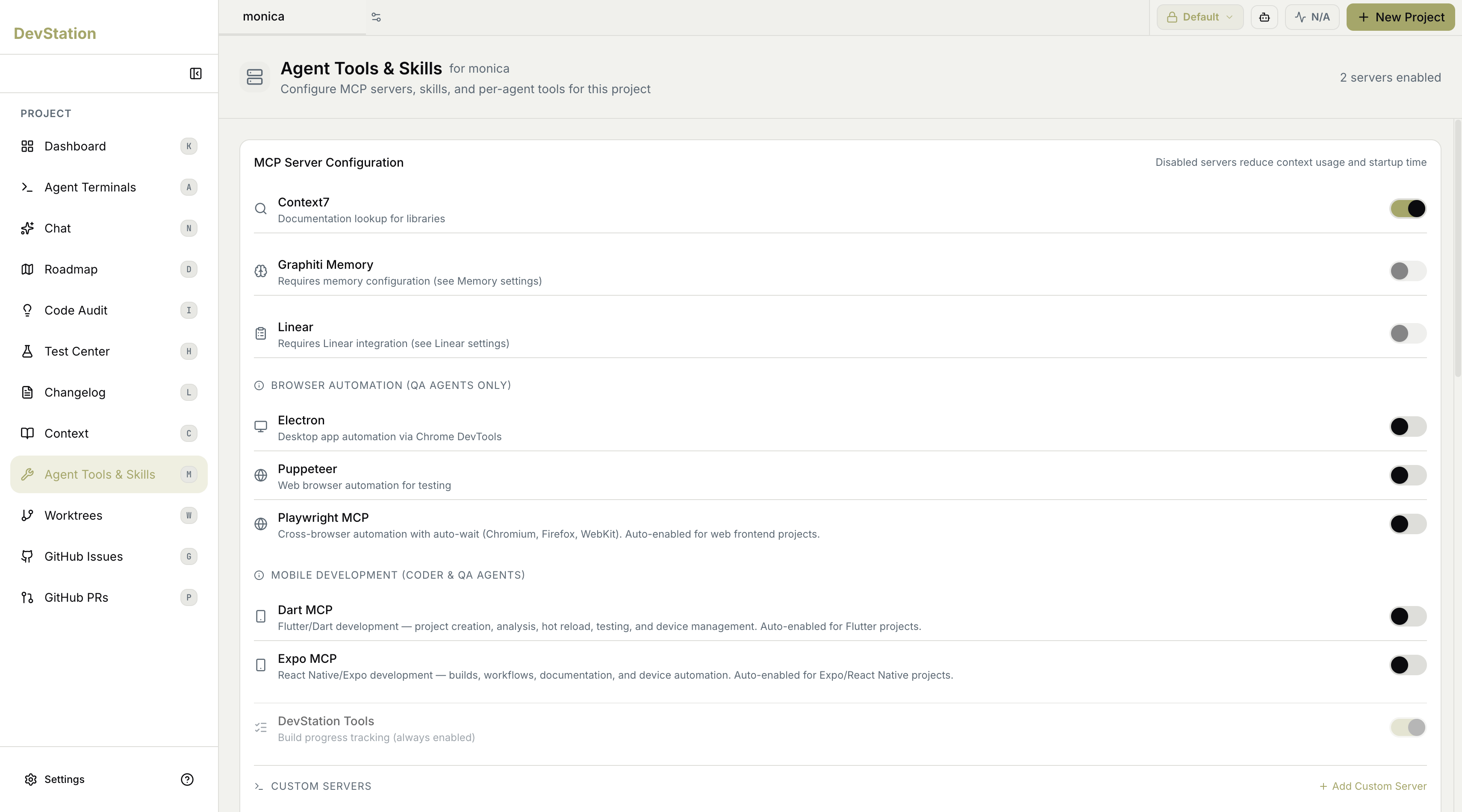
**Agent Tools & Skills** is where you configure the capabilities available to the agents working on your project — the MCP servers, skills, and per-agent tools they can call. Each server can be toggled on or off, and a count at the top shows how many are currently enabled. Turning off servers you don't need keeps agents lean: as the page notes, **disabled servers reduce context usage and startup time**.
 ## MCP server configuration
The main panel lists the available MCP servers grouped by purpose, each with a toggle. Some are enabled by default for the kind of project you're working on; others require additional configuration before they'll work, and a few are scoped to specific agent roles. Enable only the servers your project actually needs.
Some servers are **auto-enabled** based on your project type — for example, browser automation for web frontend projects, or mobile tooling for Flutter and React Native projects — so the right tools are usually on without manual setup.
## General servers
A set of general-purpose servers covers common needs:
* **Context7** — documentation lookup for libraries.
* **Graphiti Memory** — graph-based memory; requires memory configuration (see your Memory settings).
* **Linear** — issue-tracker integration; requires Linear integration (see your Linear settings).
## Browser automation
Grouped under **Browser Automation** and scoped to **QA agents**, these drive a browser for testing:
* **Electron** — desktop app automation via Chrome DevTools.
* **Puppeteer** — web browser automation for testing.
* **Playwright MCP** — cross-browser automation with auto-wait across Chromium, Firefox, and WebKit. Auto-enabled for web frontend projects.
## Mobile development
Grouped under **Mobile Development** and available to **Coder and QA agents**, these support mobile stacks:
* **Dart MCP** — Flutter/Dart development, covering project creation, analysis, hot reload, testing, and device management. Auto-enabled for Flutter projects.
* **Expo MCP** — React Native/Expo development, covering builds, workflows, documentation, and device automation. Auto-enabled for Expo/React Native projects.
## Always-on tools
Some capabilities are **always enabled** and can't be turned off because the platform depends on them — for example, **DevStation Tools**, which provides build progress tracking.
## Custom servers
Beyond the built-in servers, you can connect your own. Under **Custom Servers**, use **Add Custom Server** to register an additional MCP server for this project.
If agents feel slow to start or are using more context than you'd like, review this page and disable any servers the project isn't using — it's the most direct way to trim startup time and context overhead.
## MCP server configuration
The main panel lists the available MCP servers grouped by purpose, each with a toggle. Some are enabled by default for the kind of project you're working on; others require additional configuration before they'll work, and a few are scoped to specific agent roles. Enable only the servers your project actually needs.
Some servers are **auto-enabled** based on your project type — for example, browser automation for web frontend projects, or mobile tooling for Flutter and React Native projects — so the right tools are usually on without manual setup.
## General servers
A set of general-purpose servers covers common needs:
* **Context7** — documentation lookup for libraries.
* **Graphiti Memory** — graph-based memory; requires memory configuration (see your Memory settings).
* **Linear** — issue-tracker integration; requires Linear integration (see your Linear settings).
## Browser automation
Grouped under **Browser Automation** and scoped to **QA agents**, these drive a browser for testing:
* **Electron** — desktop app automation via Chrome DevTools.
* **Puppeteer** — web browser automation for testing.
* **Playwright MCP** — cross-browser automation with auto-wait across Chromium, Firefox, and WebKit. Auto-enabled for web frontend projects.
## Mobile development
Grouped under **Mobile Development** and available to **Coder and QA agents**, these support mobile stacks:
* **Dart MCP** — Flutter/Dart development, covering project creation, analysis, hot reload, testing, and device management. Auto-enabled for Flutter projects.
* **Expo MCP** — React Native/Expo development, covering builds, workflows, documentation, and device automation. Auto-enabled for Expo/React Native projects.
## Always-on tools
Some capabilities are **always enabled** and can't be turned off because the platform depends on them — for example, **DevStation Tools**, which provides build progress tracking.
## Custom servers
Beyond the built-in servers, you can connect your own. Under **Custom Servers**, use **Add Custom Server** to register an additional MCP server for this project.
If agents feel slow to start or are using more context than you'd like, review this page and disable any servers the project isn't using — it's the most direct way to trim startup time and context overhead.